Making Internal Systems Easier to Adopt
Pattern in Practice: How we helped public-sector teams turn communications, tasks, approvals, and reporting into a more usable workflow experience.
Internal workflow systems are usually judged by what they can do.
But they succeed or fail based on whether people actually use them.
That was the challenge behind Workflow.
Media calls.
Social media coordination.
Project updates.
Tasks.
Deliverables.
Approvals.
Reports.
Deadlines.
Each piece mattered. But when that work is spread across emails, spreadsheets, meetings, shared folders, and individual habits, the larger system becomes harder to see.
People spend more time looking for information. Teams repeat work. Managers lose visibility. Staff create workarounds. Eventually, the process becomes dependent on memory instead of structure.
Workflow was created to help change that.
The goal was to create a shared operational experience that made everyday government communications easier to manage, easier to track, and easier to improve over time.
For Part 1 of this series, we looked at tourism UX and how Explore the Whiteshell made a region easier to search.
In Part 2, we looked at digital interpretation and how the Manitoba Oil Museum made complex history easier to explore.
For Part 3, we looked at civic participation and how a public consultation experience helped people navigate electoral boundary information.
Part 4 moves behind the scenes.
The focus is internal transformation: how digital systems can support the people responsible for managing complex work every day.
Project Snapshot
Project: Workflow internal operations platform
Sector: Government / public sector / internal digital transformation
Services: UX strategy, information architecture, custom platform development, workflow design, dashboard design, reporting structure, role-based access, roadmap planning, iterative product development
Core Challenge: Turn scattered communications, tasks, approvals, reporting, and planning into a shared internal system that public-sector teams could understand, adopt, and keep improving
Primary Users: Communications staff, managers, administrators, department leads, content planners, social media coordinators, approvers, and internal stakeholders
Live Site: Private internal platform
What Pattern delivered:
Internal workflow platform for government communications and operational coordination
Structure for managing media calls, communications planning, projects, tasks, deliverables, approvals, and reporting
Role-based views to support different users and responsibilities
Dashboards and reporting tools to improve visibility across teams
Task and status tracking to reduce duplicated effort and improve coordination
Content planning support for communications and social workflows
Flexible platform architecture that could evolve through future enhancements
Iterative development process shaped by user feedback, roadmap planning, and operational needs
Adaptable foundation that could support additional public-sector implementations
The result:
Teams gained a clearer way to manage internal communications and operational work
Users could better understand responsibilities, deadlines, status updates, and related activity
Managers had improved visibility into progress, reporting, and team coordination
The platform reduced reliance on scattered emails, spreadsheets, meetings, and individual workarounds
The system could evolve as departments, reporting needs, approval processes, and use cases changed
Workflow helped turn internal digital transformation into a system people could actually adopt, adapt, and improve over time
The Tension: Internal workflow systems only work if people use them
Every organization has workflows. Some are formal and documented. Others live in inboxes, meetings, shared files, and the memory of people who have been doing the work for years.
That is why internal transformation can be difficult.
The challenge is rarely only technical. It is also cultural and operational.
In a government setting, established practices matter. Teams are used to specific ways of working. Departments have different responsibilities. Staff may have different comfort levels with new systems. Processes often involve review, approvals, permissions, reporting, and accountability.
A new tool has to enter that environment carefully.
If it adds friction, people avoid it. Ignores existing routines, people work around it. If it feels too rigid, it becomes another task instead of a better way to manage the work.
That was one of the central challenges behind Workflow.
The platform needed to support communications planning, media calls, social coordination, tasks, deliverables, reporting, and approvals across different roles. It also needed to address a deeper issue: adoption.
A system can be well-built and still fail if people do not see how it fits into their day.
That meant the work had to begin with users, not features.
The Pattern Solution: Designing around roles, routines, and adoption
For Workflow, our team focused on understanding the people who would use the system.
Different users needed different views of the same operational picture. Some needed to see what was due. Others needed to assign work, manage communications, coordinate content, review activity, or report on progress across departments.
That range of needs shaped the design.
Personas helped clarify how different roles would experience the platform. They gave the team a way to think through daily behaviours, repeated tasks, common frustrations, and the moments where a better system could reduce friction.
From there, the work became about structure.
The platform needed to bring related work together without making every user look at everything at once. It had to support shared visibility while still respecting roles, responsibilities, and permissions. It also had to make tasks easier to assign, track, and complete.
That is where internal operations UX matters.
The interface is not only a screen. It is a representation of how the organization works.
When the structure is clear, people can find what they need faster. They can understand their responsibilities and see how their work connects to other people’s work. They can spend less time managing the process and more time doing the work.
Why workflow design is change management
A workflow platform changes how people coordinate.
It affects how work is assigned, how approvals move, how deadlines are tracked, and how leaders understand activity across teams.
That means workflow design is also change management.
The system had to be useful early, but it also had to create room for learning, feedback, and improvement. A large internal platform cannot depend on one launch moment. It needs a roadmap.
For Workflow, that meant building in phases.
The project was shaped around iterative releases, user feedback, and ongoing enhancements. This approach allowed the platform to grow in a controlled way while staying aligned with operational needs.
That matters because internal tools are rarely finished in the same way a campaign website might be finished.
Organizations change. Departments change. Reporting needs change. Approval processes change. New use cases appear.
A strong internal system needs enough structure to be reliable and enough flexibility to keep evolving.
That balance became one of the most important parts of the work.
Making visibility part of the experience
One of the biggest values of a shared workflow system is visibility.
In this context, visibility is about coordination. It gives teams a clearer view of responsibilities, deadlines, status updates, and related work.
When that information is easier to see, teams can make better decisions. They can identify bottlenecks, reduce duplicated effort, and understand priorities with less back-and-forth.
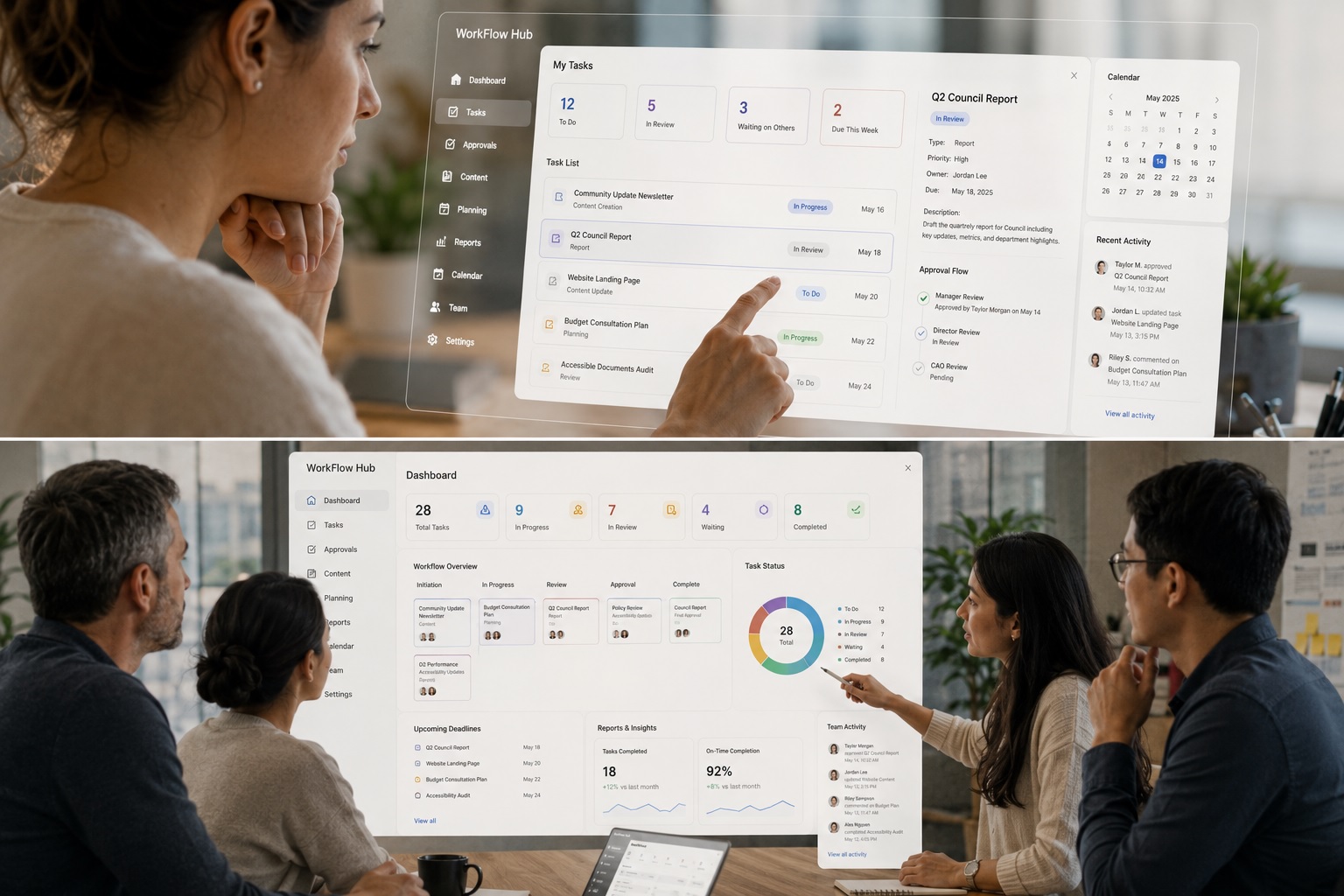
Workflow supported this through dashboards, reporting, task views, content planning, and role-based access. These elements helped different users focus on the information most relevant to their work.
A personalized view can make a large system feel smaller. A dashboard can help someone understand their week. A report can help a manager see patterns. A status update can reduce the need for another meeting. A clear permission structure can give people access to what they need without overwhelming them with what they do not.
These details may sound operational, but they shape adoption.
People are more likely to use a system when it gives them a clearer view of their work.
From one implementation to a more adaptable platform
Workflow also became a story about adaptability.
The original platform was built around government communications, media calls, project coordination, social workflows, and reporting. Over time, it continued to evolve through new priorities and feature expansions.
That evolution became important when another public-sector team needed the system adapted to its own internal processes.
The foundation was already strong, but the new implementation required specialized support for media inquiries, written content, campaign coordination, reporting, planning, approvals, and departmental workflows.
This is where modular thinking mattered.
The goal was to adapt the system in a way that supported new needs while preserving consistency across the platform.
Customization can be powerful, but without structure it can create complexity. A platform should be flexible enough to support real differences in how teams work, while remaining consistent enough to stay understandable, maintainable, and scalable.
For Workflow, that meant treating new features as part of a larger system rather than separate additions layered on over time.
The Long-Term Impact: A system that could keep improving
The strongest internal systems are built around long-term usefulness.
Workflow was designed to evolve after launch. New needs could be identified. Enhancements could be planned. Features could be refined. Teams could continue shaping the platform through real use.
That approach helped protect the value of the investment.
Instead of treating the platform as a fixed product, the work treated it as an operational system that could grow with the organization.
This matters for public-sector teams.
Budgets are real. Training time is limited. Staff capacity matters. Change can be difficult.
A system that launches with too much complexity can overwhelm users. A system that cannot evolve can become outdated. The better path is often phased, practical, and grounded in feedback.
That is what Workflow was built to support: a clearer way to manage work today, with a roadmap for improving it tomorrow.
Putting a Pattern into Practice
Workflow was about internal digital transformation.
It asked us to think about how teams communicate, how tasks move, how approvals happen, how reports are created, and how people adopt new systems inside established organizations.
The work required user research, information architecture, operational understanding, dashboard design, role-based thinking, roadmap planning, and respect for the fact that internal tools have to earn their place in someone’s day.
A useful internal system does not ask people to work around the tool.
It helps the tool fit the work.
Workflow helped turn scattered communications, tasks, approvals, and reporting into a more shared operational experience.
Easier to see.
Easy to manage.
Easier to improve.
Easier to adopt.
That is the real value of well-designed internal workflow systems: they reduce friction without asking people to abandon the realities of their work.
Categories
- Accessibility & Inclusive Design
- Awards, Media & Recognition
- Digital Governance & Risk
- Government & Civic Technology
- Hosting, Maintenance & Website Care
- Interactive Experiences & Digital Storytelling
- Museums, Heritage, & Art Organizations
- Pattern in Practice
- Research, Prototyping & Emerging Technology
- Websites, UX & Digital Platforms